


To stop your 5G router from overheating, place it in a well-ventilated indoor location away from direct sunlight, enclosed cabinets, and heat-producing equipment. Keep its ventilation openings clear, use the manufacturer-approved power adapter, and check for firmware updates. If the router repeatedly slows down or restarts, inspect its operating temperature limits, signal conditions, and hardware health before replacing it.
During Saudi Arabia's hot summer months, indoor 5G routers may operate in environments where heat accumulates quickly. A router positioned near a sunny window, inside a closed cabinet, or beside other electronic equipment may experience higher temperatures than expected.
Heat management becomes particularly important when the router supplies internet to a home office, retail store, business reception area, or other location that depends on continuous connectivity.
In this guide, Future Networks explains how to recognize possible heat-related router problems, improve placement and ventilation, distinguish overheating from weak mobile signals, and select appropriate networking solutions for Saudi conditions.
 Call Now
 WhatsApp
Why Does My 5G Router Get So Hot?
A 5G router produces heat while processing data, communicating with the mobile network, and distributing internet through Wi-Fi or Ethernet. Its temperature can rise further when the surrounding air is warm or ventilation is restricted.
Is it normal for a 5G router to feel warm?
Yes. Some warmth is normal because electronic components generate heat during operation.
A router's processor, cellular modem, power circuits, and wireless components all consume electrical energy. Some of that energy becomes heat.
A warm external casing does not automatically indicate a fault. The important question is whether the device remains within its specified operating conditions and functions normally.
Why does my router become hotter during heavy internet use?
Higher workloads can increase power consumption and heat generation, although the effect varies by model.
Activities such as transferring large files, serving multiple connected devices, or maintaining a demanding cellular connection may increase the workload of internal components.
However, heavy traffic is not the only possible cause. Poor ventilation, unusually high ambient temperature, or an electrical problem may also contribute.
Can weak 5G signal make a router hotter?
Weak or unstable cellular conditions can affect modem behavior and power consumption, but they do not prove that overheating is occurring.
A cellular modem may change transmission parameters, bands, or power levels according to network conditions.
The actual thermal effect depends on the router hardware, mobile network, signal quality, and workload.
Does the Saudi summer increase overheating risks?
High surrounding temperatures can reduce the router's ability to dissipate heat.
A router placed in an air-conditioned room may operate very differently from the same device placed inside an unventilated enclosure exposed to afternoon sunlight.
Do not assume that an indoor router is designed to operate outdoors simply because it supports 5G connectivity.
How Do I Know If My 5G Router Is Overheating?
Look for repeated temperature warnings, unexpected shutdowns, heat-related performance reductions, or abnormal behavior that appears when the device becomes hot.
What are the common symptoms of router overheating?
Possible symptoms include unexpected restarts, shutdowns, performance reduction, and temperature warnings.
Depending on the model, you may notice:
- The router unexpectedly powers off.
- The router restarts during extended operation.
- Internet performance deteriorates after prolonged use.
- The device displays a temperature or hardware warning.
- Performance improves after the device returns to normal operating conditions.
- The device becomes unusually hot compared with its normal operation.
These symptoms are not exclusive to overheating. Power adapter faults, firmware defects, and mobile network interruptions can produce similar behavior.
Does a hot router always mean it is damaged?
No. Heat alone does not establish that the router has failed.
Some routers are designed to dissipate heat through their external casing.
However, a burning smell, visible deformation, smoke, a damaged power connection, or a swollen battery is a serious warning. Stop using the affected equipment, disconnect power when safe, and contact qualified support.
How do I check the router temperature?
Use the device's official management interface or diagnostic tools if temperature information is supported.
Not every 5G router provides an internal temperature reading to users.
If the interface does not expose this information, do not assume a temperature based on how warm the surface feels. Compare the symptoms with the manufacturer's troubleshooting guidance.
How do I distinguish overheating from other problems?
Check the timing of the problem, device status, power supply, mobile network connection, and available system logs.
| Symptom | Possible Cause | What to Check First |
|---|---|---|
| Router restarts after prolonged operation | Heat, unstable power, firmware, or hardware fault | Ventilation, power adapter, logs, and firmware |
| Internet slows during hot afternoons | Heat, cellular congestion, or changing radio conditions | Router status, network indicators, and comparative tests |
| Wi-Fi disappears but router stays powered | Wireless subsystem, firmware, configuration, or heat issue | Wi-Fi status and wired connection |
| 5G disconnects while Wi-Fi remains active | Mobile network issue, modem problem, or radio conditions | Cellular status and operator service |
| Device displays temperature warning | Temperature protection or sensor alert | Manufacturer instructions and ambient conditions |
| Router shows physical damage or burning smell | Potential electrical or hardware hazard | Stop use and arrange qualified inspection |
Where Should I Put My 5G Router to Keep It Cool?
Choose a stable, ventilated indoor location away from direct sunlight, heaters, enclosed shelves, and other concentrated sources of heat.
Can I place my router beside a sunny window?
Direct sunlight can increase the router's temperature and should generally be avoided.
A sunny window may appear attractive because it provides a better cellular signal, but solar heating can create an unfavorable operating environment.
Instead, look for a shaded location that provides acceptable signal quality and sufficient ventilation.
Can I keep the router inside a closed cabinet?
A tightly enclosed cabinet can restrict airflow and trap heat around the router.
Unless the cabinet has suitable ventilation and the manufacturer permits the installation, an open shelf is generally a safer choice.
Should I place the router near an air conditioner?
An air-conditioned room can provide a more suitable ambient temperature, but avoid placing the router where condensation, dripping water, or direct environmental stress may occur.
Keep the device away from water and follow the manufacturer's humidity and temperature requirements.
Does placing the router higher improve cooling?
Height alone does not guarantee better cooling.
A high shelf may improve some cellular reception conditions but could also be closer to a warm ceiling or receive more sunlight.
Choose a location based on both radio performance and environmental conditions.

What Is the Best Operating Temperature for a 5G Router?
The correct operating temperature is the range specified for the exact router model. Different devices have different thermal limits, and there is no universal temperature rating for every 5G router.
Can every 5G router operate at 40°C?
No. A 40°C ambient temperature may be within the specifications of some routers but outside the permitted range of others.
Always distinguish ambient operating temperature from an internal sensor reading or external casing temperature.
These measurements do not necessarily use the same limits.
Are outdoor 5G routers more heat resistant?
Some outdoor routers are engineered for wider environmental operating conditions, but the actual rating depends on the model.
Outdoor equipment may have specialized enclosures, sealing, materials, and thermal designs.
However, weather resistance does not mean that a device can be installed under any temperature or sunlight conditions.
How do I find my router's temperature rating?
Check the manufacturer's official specifications or user manual for your exact model and hardware version.
Look for operating temperature, storage temperature, humidity limits, permitted mounting orientation, and ventilation requirements.
For additional manufacturer guidance, consult ASUS official mobile-router overheating guidance, which discusses ventilation, sunlight exposure, and firmware checks.
How Do I Improve Router Ventilation Safely?
Improve ventilation by following the device's approved mounting instructions, keeping airflow paths open, and avoiding heat accumulation around the router.
Should I stand my router upright?
Use the orientation approved by the manufacturer.
Some routers are designed to stand vertically, while others use different enclosure and ventilation arrangements.
Changing orientation without checking the manual could block vents or reduce stability.
Can I put a fan beside my router?
Additional room airflow may help in some installations, but a fan is not a substitute for a suitable environment or functioning hardware.
Do not open the router, modify its internal cooling system, or attach unapproved electrical accessories.
If the device requires improvised cooling to remain operational under normal conditions, investigate the underlying problem.
Should I drill ventilation holes into the router?
No. Do not drill, cut, or modify the enclosure of a 5G router.
Such changes can create electrical hazards, introduce dust, damage components, and compromise the product's safety design.
What cooling approach should I choose?
Start with manufacturer-approved placement and environmental improvements before considering additional equipment.
| Cooling Approach | Potential Benefit | Important Limitation |
|---|---|---|
| Open ventilated shelf | Reduces trapped heat | Must still provide suitable cellular reception |
| Shaded indoor placement | Reduces solar heating | Signal quality must be tested |
| Air-conditioned room | Provides a controlled ambient environment | Avoid condensation and water exposure |
| Improved room airflow | May reduce local heat buildup | Does not repair a faulty router |
| Manufacturer-approved mounting | Preserves intended cooling design | Requirements vary by model |
| DIY enclosure modification | Not recommended | Safety, damage, and warranty risks |
Does Heat Affect 5G Internet Speed?
Excessive heat can affect device performance when the router reduces workload, disables certain functions, restarts, or shuts down to protect its components.
Can overheating make 5G internet slower?
Yes, some routers may reduce performance under excessive thermal conditions.
This is sometimes called thermal throttling, meaning the device limits certain operations to manage temperature.
However, not every slowdown is caused by thermal throttling.
Why is my 5G internet slower in the afternoon?
Possible causes include cellular network congestion, changing signal conditions, local Wi-Fi interference, and device temperature.
Compare network indicators and device behavior at different times before attributing the slowdown to heat.
Can overheating cause the router to switch from 5G to 4G?
Some devices may change radio behavior under particular operating conditions, but a switch to 4G does not automatically indicate overheating.
Mobile operators, signal quality, network configuration, and device firmware can all influence cellular technology selection.
How can I test whether heat is reducing performance?
Compare device performance under normal and problematic conditions while keeping other factors as consistent as possible.
Record the time, ambient conditions, signal metrics, device warnings, and speed measurements.
Because mobile network conditions change over time, a single speed test is insufficient to establish the cause.

How Do I Make My Internet Strong?
To make your internet connection stronger and more reliable, identify whether the limitation comes from the mobile network, the router, the Wi-Fi system, or environmental conditions.
Does moving my router improve 5G signal?
It can. Cellular reception may change significantly between locations inside the same building.
Building materials, window coatings, surrounding structures, and the direction of nearby mobile network sites may affect reception.
Test possible locations using signal quality indicators and real network performance rather than relying only on the number of signal bars.
Should I choose the strongest signal location even if it is hot?
No. A router must remain within its permitted environmental operating conditions.
A location that provides a slightly stronger cellular signal but exposes the router to excessive heat may not be a suitable long-term solution.
Look for a location that balances signal quality, ventilation, equipment safety, and convenient cabling.
Can Ethernet improve internet stability?
Ethernet can reduce dependence on the local Wi-Fi connection, but it does not improve the cellular signal feeding the router.
For stationary devices such as desktop computers, network switches, and some security systems, a wired connection can help eliminate local wireless interference as a troubleshooting variable.
Will buying a more expensive router guarantee faster internet?
No. Router performance depends on network compatibility, modem capabilities, firmware, signal conditions, and operator capacity.
Before upgrading, determine whether your current router is the actual performance bottleneck.
How Do I Boost My Mobile Signal?
Improve mobile signal reception by checking network coverage, comparing suitable installation locations, and evaluating compatible external antenna solutions where necessary.
Can a better router location improve mobile signal?
Yes. Moving the device away from signal-blocking structures may improve reception.
However, the improvement must be verified using connection quality and performance data.
A stronger signal reading does not always translate into higher download speeds because network congestion and other factors remain important.
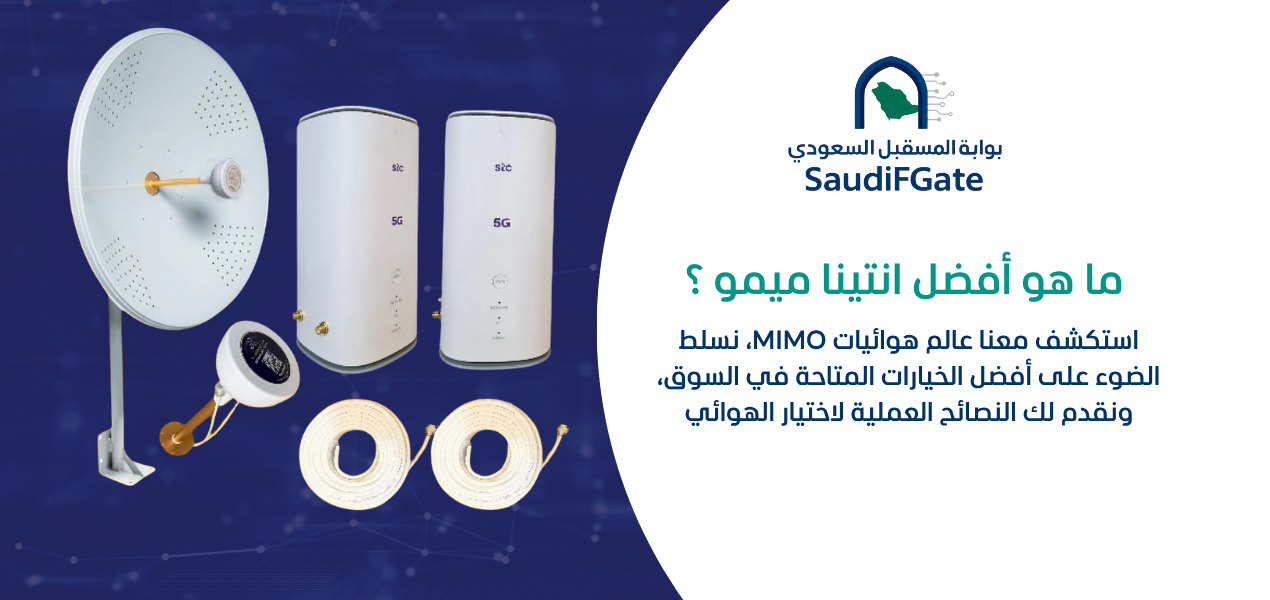
Can an external antenna improve my 5G connection?
A compatible external antenna may improve cellular reception when it is properly selected and installed.
The outcome depends on antenna characteristics, cable losses, supported bands, router compatibility, network conditions, and installation quality.
An external antenna should not be purchased solely on the basis of advertised gain.
Does an external antenna reduce router heat?
Not directly. An external antenna is primarily a radio reception solution, not a cooling system.
However, a suitable antenna installation may make it possible to keep an indoor router in a cooler location while receiving the cellular signal through a compatible antenna system.
That arrangement must be evaluated for cable loss, signal performance, and equipment compatibility.
Can I use a cellular signal booster instead?
Signal boosters and external router antennas are different technologies and may be subject to different requirements.
Do not install unauthorized active cellular amplification equipment. Review the applicable Saudi telecommunications requirements and use compliant equipment.
How Do I Install the Antenna?
Begin by confirming that your exact router supports the intended external antenna, then select compatible equipment and an installation location that meets technical, safety, and regulatory requirements.
Does every 5G router support an external antenna?
No. Some routers have dedicated external antenna ports, while others do not provide supported external antenna connections.
Even when a device has antenna connectors, confirm which cellular functions and frequency bands those connections support.
Do not open the enclosure or modify internal antenna connections unless the manufacturer explicitly authorizes the work.
Where should I install an external 5G antenna?
Choose a structurally safe location with favorable radio conditions and an appropriate cable route.
The best position depends on the surrounding buildings, signal source, antenna directionality, and installation constraints.
Outdoor equipment must be rated for the environment in which it will operate.
Can I install the antenna on a rooftop?
Rooftop installation may be appropriate when the equipment, mounting system, building permissions, and safety conditions allow it.
Installation should be performed by qualified personnel where roof access, height, electrical hazards, or structural mounting are involved.
Follow applicable requirements for grounding, surge protection, weatherproofing, and cable routing.
Can I connect an outdoor antenna to an indoor router?
Yes, if the router supports the antenna configuration and the complete cable system is compatible.
Excessive cable length or unsuitable connectors can reduce the benefit of the antenna.
Do not assume that all MIMO antenna systems use the same number of connections or internal configuration.
What should I verify before purchasing an antenna?
Confirm technical compatibility and the installation requirements before placing an order.
| Requirement | What to Verify | Why It Matters |
|---|---|---|
| Router compatibility | Exact model and supported antenna ports | Prevents incompatible purchases |
| Frequency support | Antenna and relevant cellular bands | Supports intended network operation |
| MIMO configuration | Required antenna elements and connections | Avoids unsuitable radio configurations |
| Cable system | Cable type, loss, length, and connectors | Limits avoidable signal loss |
| Outdoor suitability | Environmental and mounting ratings | Supports safe operation in local conditions |
| Saudi compliance | Relevant equipment and installation requirements | Helps ensure compliant deployment |
For official Saudi communications equipment requirements, consult the Communications, Space and Technology Commission regulations.

Can I Install My Indoor 5G Router Outside?
Do not place an indoor-rated router outdoors unless the manufacturer explicitly permits that installation and its environmental specifications are satisfied.
Can I leave my router on the roof during summer?
Not if it is an indoor device without appropriate outdoor operating approval.
A rooftop can expose electronics to solar heating, rain, dust, humidity, and temperature extremes.
An improvised plastic cover does not automatically provide suitable environmental protection and may trap heat.
Is a waterproof router box a safe solution?
A waterproof enclosure alone does not establish thermal suitability.
Sealed enclosures can retain heat, especially when exposed to direct sunlight.
Any enclosure must be engineered for the equipment's heat dissipation, electrical requirements, and environmental conditions.
Should I buy an outdoor 5G CPE instead?
An outdoor-rated 5G customer premises equipment unit may be appropriate when outdoor reception is necessary.
CPE means customer premises equipment: networking hardware installed at a customer's location to connect to a service provider.
Confirm the operating temperature range, ingress protection, power requirements, mounting specifications, network compatibility, and Saudi equipment compliance.
Why Does My 5G Router Restart in Hot Weather?
Unexpected restarts may result from thermal protection, an unstable power supply, firmware faults, or hardware problems. Accurate troubleshooting should separate these possible causes.
Can overheating trigger an automatic shutdown?
Yes. Some mobile routers and hotspots include thermal protection that reduces performance or shuts down the device under excessive heat.
For manufacturer information about heat-related performance and shutdowns, see NETGEAR's official overheating guidance.
The exact protection mechanism depends on the model.
Could the power adapter cause router restarts?
Yes. An unstable, damaged, or incompatible power adapter may cause unexpected resets.
Use only the specified power supply or a manufacturer-approved replacement with the correct electrical characteristics.
Do not experiment with higher-voltage adapters or improvised power connections.
Will updating firmware fix overheating?
A firmware update may resolve some stability or power-management problems, but it cannot fix every thermal or hardware defect.
Use official manufacturer firmware intended for your exact device model and version.
Follow the update procedure carefully and avoid interrupting power during installation.
What should I do when the router shuts down unexpectedly?
Check for visible damage or safety hazards, then follow the manufacturer's troubleshooting instructions.
If the device has no warning signs and the manufacturer permits normal restart procedures, allow it to return to an appropriate environment before further testing.
Repeated unexplained shutdowns warrant professional diagnosis or manufacturer support.
How Do I Protect My 5G Router During Saudi Summer?
Use a suitable indoor installation, avoid direct heat exposure, maintain airflow, and inspect the device when operating conditions change.
Should I turn off my router during the hottest hours?
A properly installed router should be operated within its rated environmental limits.
Routine shutdowns should not be necessary merely because it is summer if the device remains within specifications and works normally.
If the environment exceeds the permitted limits, address the installation conditions rather than treating repeated shutdowns as the permanent solution.
How do I protect the router when the air conditioning is off?
Evaluate the room's actual ambient temperature and whether the router remains within the manufacturer's operating limits.
If the space regularly exceeds those limits, consider relocating the router or using equipment rated for that environment.
Can dust make overheating worse?
Dust accumulation can interfere with airflow and heat dissipation in some devices.
Keep the surrounding environment reasonably clean and follow the manufacturer's cleaning instructions.
Do not insert metal tools or liquids into ventilation openings.
What maintenance schedule should I follow?
Use the manufacturer's recommendations and increase inspection attention when the router operates in dusty or unusually warm environments.
Check for blocked vents, unstable power connections, unexpected restarts, and outdated firmware.
How Do I Troubleshoot a Router That Gets Hot and Slow?
Use a structured test sequence rather than changing several settings at once. This makes it easier to identify the actual cause.
What should I test first?
Start with the installation environment and power supply before changing network settings.
Confirm that the router is not exposed to direct sunlight, its vents are unobstructed, and it uses a suitable power adapter.
Should I test Wi-Fi and Ethernet separately?
Yes, if the router supports Ethernet and the connected device is compatible.
A wired test can help distinguish problems with the local Wi-Fi connection from problems affecting the router's internet connection.
How do I know if the mobile network is responsible?
Compare the router's cellular connection status and available radio metrics with the observed performance problem.
Indicators such as RSRP, RSRQ, and SINR may help explain reception conditions when the router exposes them.
They must be interpreted alongside operator capacity and network behavior.
What is the correct troubleshooting order?
Follow a process that separates environmental, electrical, wireless, and software causes.
| Step | Inspection | Expected Outcome |
|---|---|---|
| 1 | Check for damage or electrical hazards | Establish whether use can continue safely |
| 2 | Inspect ventilation and ambient conditions | Identify environmental heat exposure |
| 3 | Verify approved power supply | Reduce likelihood of power-related resets |
| 4 | Review device warnings and logs | Identify available diagnostic evidence |
| 5 | Compare cellular and Wi-Fi operation | Separate connection problems |
| 6 | Review official firmware availability | Address supported software fixes |
| 7 | Request qualified technical diagnosis | Resolve recurring unexplained faults |

Should I Replace My 5G Router If It Overheats?
Replacement may be appropriate when the device repeatedly fails within its approved operating conditions, has confirmed hardware damage, or cannot meet the installation requirements.
When is router replacement necessary?
Consider replacement when manufacturer support identifies a fault, the hardware is unsafe, or repeated failures remain unresolved after appropriate diagnosis.
Do not replace the router solely because its casing feels warm.
Should I choose a router with better cooling?
Cooling design should be one of the selection criteria when the installation environment is demanding.
Also consider cellular compatibility, supported frequency bands, Wi-Fi capabilities, Ethernet ports, operating temperature limits, and manufacturer support.
Is a 5G outdoor router always better?
No. Outdoor equipment is appropriate for specific installations but may add mounting, cabling, power, and maintenance requirements.
An indoor router operating correctly in a suitable environment may be a simpler and more economical solution.
Can I keep my existing router and install an external antenna?
Possibly, if the device supports compatible external antennas and its hardware remains functional.
An external antenna may help improve reception or allow more flexible placement, but it does not repair an overheating fault.
How Much Does It Cost to Fix an Overheating 5G Router?
The cost depends on whether the issue can be resolved through placement and ventilation, requires a power supply or manufacturer service, or calls for different networking equipment.
Can I fix overheating without buying anything?
Sometimes. Correcting direct sunlight exposure, removing obstructions, or moving the device to a suitable environment may resolve an installation-related issue.
However, do not assume that all overheating problems are caused by poor placement.
Will I need to buy a cooling fan?
Not necessarily. A suitable installation should meet the device's approved operating conditions without unsafe modifications.
If supplemental ventilation is being considered, ensure it does not conflict with manufacturer instructions or introduce electrical hazards.
How much does an external antenna installation cost?
Pricing depends on antenna compatibility, mounting requirements, cable routing, materials, labor, and site conditions.
A reliable quotation requires the router model and installation details.
How do I choose the most cost-effective solution?
Identify the underlying fault before paying for additional equipment.
Replacing a working router will not solve mobile network congestion, and installing an antenna will not repair a defective power circuit.
What Mistakes Make 5G Routers Overheat?
Common mistakes include placing the router in direct sunlight, covering ventilation openings, using incompatible power supplies, and installing indoor devices in unsuitable outdoor environments.
Can covering the router with a cloth cause problems?
Yes. Covering ventilation openings can obstruct airflow and trap heat.
Keep fabrics, papers, and decorative coverings away from the router's cooling paths.
Is it safe to place the router on top of another electronic device?
Stacking equipment can increase local heat buildup and obstruct ventilation.
Follow the mounting and clearance requirements of each device rather than assuming all equipment can be stacked safely.
Can an incompatible power adapter cause overheating?
Yes. An unsuitable power supply may create electrical or thermal problems and damage equipment.
Use the correct manufacturer-approved power specification.
What installation mistakes should I avoid?
Avoid changes that compromise the device's cooling design, environmental protection, or electrical safety.
- Placing an indoor router in direct afternoon sunlight.
- Installing the device inside an unventilated cabinet.
- Blocking ventilation openings with decorative objects.
- Using an incompatible power adapter.
- Leaving an indoor device outdoors without approval.
- Wrapping the router in insulating material.
- Drilling or modifying the router enclosure.
- Ignoring repeated temperature warnings.
- Assuming every internet slowdown is caused by heat.
- Installing unsuitable antennas without compatibility checks.
How Do I Choose a Router for a Hot Saudi Environment?
Select a router based on its documented environmental ratings, network compatibility, installation requirements, and intended workload.
Should I choose a specific router brand for hot weather?
Choose according to verified model specifications rather than assuming every product from one brand has the same temperature tolerance.
Different models within the same brand may have substantially different operating temperature ranges.
Do ZTE and Huawei 5G routers have the same cooling requirements?
Not necessarily. Cooling and operating temperature requirements vary by exact model and hardware design.
Check the official specification sheet and installation guidance for the product being considered.
Should I prioritize Wi-Fi speed or cooling?
Both performance and environmental suitability matter, but a router that cannot operate reliably in its intended location is not a good choice.
Evaluate cellular capabilities, Wi-Fi performance, wired networking, power requirements, and installation conditions as a complete system.
Can Future Networks help me select the right router?
You can contact Future Networks to discuss router specifications, external antenna compatibility, and suitable networking options.
Provide the exact router model, installation location, network operator, and symptoms so the available options can be assessed.
What Are the Most Common Questions About 5G Router Overheating?
These frequently asked questions address heat management, router placement, 5G signal performance, and troubleshooting in Saudi Arabia.
1. Why does my 5G router get hot?
Routers generate heat during normal electronic operation. High ambient temperatures, heavy workloads, and restricted ventilation may increase that heat.
2. How do I stop my 5G router from overheating?
Keep the device in a suitable ventilated environment, away from direct sunlight, and follow its official operating requirements. Investigate repeated warnings or shutdowns.
3. Can hot weather make 5G internet slower?
Excessive device temperature may reduce performance in some routers. However, network congestion and radio conditions can also cause slow internet.
4. Should I put my router beside an air conditioner?
A temperature-controlled room may help, but avoid condensation, water exposure, and unsuitable airflow conditions.
5. Can I install my indoor 5G router outside?
Not unless the manufacturer expressly permits that environment and the device's specifications support it.
6. How do I make my internet strong?
Check signal quality, network conditions, router placement, and Wi-Fi performance. Improve the actual bottleneck rather than changing equipment randomly.
7. How do I boost my mobile signal?
Compare suitable reception locations and consider compatible external antennas when needed. Follow applicable technical and regulatory requirements.
8. How do I install the antenna?
Verify compatibility, choose a safe installation location, use suitable cabling, and follow manufacturer and Saudi regulatory requirements. Use qualified installers for hazardous work.
9. Does a cooling fan fix an overheating router?
Not necessarily. Improving airflow may help in some situations, but a fan does not repair defective hardware or make an unsuitable installation safe.
10. When should I replace my overheating router?
Consider replacement when the device is damaged, unsafe, unsupported, or repeatedly fails within its approved operating conditions after proper diagnosis.
What Should I Check Before Installing a 5G Router in Saudi Arabia?
Before installation, verify the device's environmental limits, placement, ventilation, electrical requirements, cellular reception, and supported networking features.
What is the router installation checklist?
Use this checklist before installing or relocating a 5G router.
- ☐ Confirm the exact router model and hardware version.
- ☐ Check the manufacturer's operating temperature range.
- ☐ Confirm the router is intended for indoor or outdoor use.
- ☐ Select a stable, secure installation surface.
- ☐ Keep the router away from direct sunlight.
- ☐ Avoid tightly enclosed cabinets.
- ☐ Keep all ventilation openings unobstructed.
- ☐ Use the approved power adapter.
- ☐ Check for moisture and condensation risks.
- ☐ Verify mobile network reception in the chosen location.
- ☐ Test internet performance under normal conditions.
- ☐ Check whether firmware updates are available.
- ☐ Confirm the router's permitted mounting orientation.
- ☐ Review external antenna compatibility if needed.
- ☐ Avoid unauthorized device modifications.
- ☐ Document repeated faults or temperature warnings.
- ☐ Confirm the installation meets relevant Saudi requirements.
Should I test the router before permanent installation?
Yes. Compare suitable locations and verify both network performance and environmental conditions.
A location should not be selected only because it produces the highest download speed in a single test.
What should I do after installation?
Monitor the router's stability, internet performance, and available system warnings during normal usage.
If repeated problems occur, document the symptoms and request technical assessment before making major changes.

How Can I Keep My 5G Internet Stable Throughout the Summer?
Reliable summer connectivity depends on suitable equipment, controlled environmental conditions, proper mobile reception, and systematic troubleshooting when problems occur.
What is the most important improvement I can make today?
Check whether the router is operating in a suitable, well-ventilated location without direct heat exposure.
This is a practical first step because environmental problems can often be identified without purchasing new equipment.
Should I improve ventilation or upgrade the router?
Correct environmental installation problems first, then evaluate the equipment if problems persist.
If the router continues to fail within its supported operating conditions, manufacturer support or replacement may be appropriate.
How can Future Networks help with my 5G setup?
Future Networks can be contacted to discuss 5G routers, antenna solutions, networking equipment, and installation requirements.
When contacting the team, share your router model, mobile operator, installation conditions, and whether the problem involves unexpected restarts, weak signal, or slow internet.
If you are asking How Do I Stop My 5G Router From Overheating?, begin with correct placement, ventilation, and the manufacturer's temperature limits. Then verify the power supply, software, and cellular network conditions before purchasing replacement equipment.
Explore networking products and contact information through the official Future Networks Saudi Arabia website.
Future Networks | بوابة المستقبل للشبكات – Saudi Arabia.