


To stop internet drops during video calls, first determine whether the problem comes from your Wi-Fi connection, router, internet provider, or video conferencing application. Test your connection using Ethernet, check packet loss and latency, monitor upload stability, and examine 5G signal quality if you use mobile broadband. Fix the identified cause rather than relying on download speed alone.
Whether you work from home in Riyadh, attend online training in Jeddah, or manage remote meetings elsewhere in Saudi Arabia, an unstable internet connection can interrupt important conversations even when speed tests report fast download speeds.
Video conferencing depends on consistent two-way data transmission. Short interruptions, fluctuating latency, packet loss, and unstable upload speeds can cause freezing, robotic audio, delayed speech, or complete disconnections.
This guide from Future Networks, بوابة المستقبل للشبكات, explains how to identify the real cause of unstable video calls and improve connection reliability using practical network troubleshooting.
 Call Now
 WhatsApp
Why Does My Internet Keep Dropping During Video Calls?
Why does my video freeze even when my internet is fast?
Video can freeze because of packet loss, unstable upload bandwidth, fluctuating latency, local wireless interference, or temporary interruptions between your device and the conferencing server.
A speed test usually measures performance over a short interval. It may not reveal brief interruptions that occur during a longer meeting.
Can video meetings fail without a complete internet disconnection?
Yes. A connection can remain technically active while its quality becomes insufficient for real-time audio and video.
Packets may arrive too late or fail to arrive, causing the application to reduce video quality, freeze frames, or temporarily interrupt sound.
Why do other websites work while my video call freezes?
Websites and video streaming services can buffer content, while live meetings require timely communication in both directions.
A connection with inconsistent latency or upload performance may appear acceptable for browsing but perform poorly during interactive calls.
Does the video conferencing application cause connection problems?
Sometimes. Application configuration, outdated software, device performance, and service-side issues may affect meetings.
Before replacing networking equipment, determine whether the problem occurs across multiple applications and devices.
How Do I Know Whether Wi-Fi or My Internet Provider Is Causing the Problem?
How can I test whether my Wi-Fi is unstable?
Connect your computer directly to the router using an Ethernet cable when possible, then repeat a meeting or connection stability test.
If the problem disappears over Ethernet but continues over Wi-Fi, investigate wireless interference, signal coverage, device compatibility, or access point performance.
What if video calls freeze on both Ethernet and Wi-Fi?
That suggests investigating the router, internet connection, service provider, device, and application rather than treating Wi-Fi as the only possible cause.
Compare results on another computer or phone to help narrow the problem.
How do I identify where the connection is failing?
Use a structured test that compares connectivity to your router with connectivity to an appropriate external destination.
Local packet loss may indicate a home network problem, while failures occurring beyond the router may require further investigation of the upstream connection.
Be aware that some devices and network services limit diagnostic responses, so a failed ping response alone does not prove network failure.
| Test Result | Possible Cause | Recommended Investigation |
|---|---|---|
| Video calls freeze only on Wi-Fi | Wireless interference or coverage | Compare signal quality, bands and Ethernet performance |
| Video calls freeze on Wi-Fi and Ethernet | Router, ISP, device or application issue | Test multiple devices and external connectivity |
| Only one conferencing application freezes | Application configuration or service issue | Review app diagnostics and service status |
| Calls deteriorate during uploads | Upload saturation or queueing delay | Monitor upstream traffic and loaded latency |
| Calls fail at particular times | Time-dependent congestion or interference | Compare repeated measurements across different periods |
| Calls freeze when the device moves | Coverage gaps or roaming behavior | Test signal strength and access point transitions |
How Do I Check Internet Stability for Video Meetings?
Is an internet speed test enough to diagnose video call problems?
No. Download and upload speed measurements provide useful information, but they do not fully describe latency variation, packet loss, or interruptions over time.
Use speed tests alongside connection monitoring and application diagnostic information where available.
What is latency and why does it matter?
Latency is the delay required for data to travel between network endpoints.
High latency can make conversations feel delayed and may cause participants to speak over one another.
The measured latency depends on the destination, network conditions, and test methodology.
What is jitter in a video call?
Jitter describes variation in packet arrival timing or network delay.
Excessive jitter can cause inconsistent audio and video delivery, even when average latency appears acceptable.
What is packet loss?
Packet loss occurs when transmitted network packets fail to reach their intended destination.
Real-time applications may compensate for some loss, but persistent or severe loss can degrade audio, video, and overall connection reliability.
How do I monitor a connection during a meeting?
Use the conferencing application's network statistics when available, or suitable diagnostic software that can monitor connection quality over time.
Record when problems occur and compare those periods with network measurements and router status information.

What Internet Speed Do I Need for Stable Video Calls?
Is download speed more important than upload speed?
Both matter, but upload performance is particularly important because your device must continuously transmit audio and video to the meeting service.
Unstable upstream capacity can make your outgoing video freeze or audio break up even when downloading remains fast.
Is a 5G connection fast enough for video conferencing?
It can be. A suitable 5G connection may support high-quality video meetings, provided signal conditions, network capacity, router performance, and upload stability are sufficient.
However, advertised peak speeds do not guarantee consistent performance at a particular address.
How much bandwidth does Zoom or Microsoft Teams require?
Bandwidth needs vary by application, resolution, participant layout, screen sharing, and service settings.
Check the current official requirements published by your conferencing provider and allow additional capacity for other active applications.
Why is my connection unstable despite high download speeds?
A connection may offer substantial download bandwidth while experiencing packet loss, temporary upload congestion, or fluctuating latency.
Reliability should be assessed using multiple indicators rather than one headline speed measurement.
| Network Metric | What It Measures | Possible Video Call Impact |
|---|---|---|
| Download speed | Incoming data capacity | Receiving video and shared content |
| Upload speed | Outgoing data capacity | Sending your camera video and audio |
| Latency | Communication delay | Delayed conversation and responses |
| Jitter | Variation in packet timing | Uneven sound and video delivery |
| Packet loss | Data packets that fail to arrive | Frozen frames and interrupted audio |
| Loaded latency | Delay while the network carries traffic | Meeting quality deterioration during other network activity |
| Connection interruptions | Temporary loss of connectivity | Call reconnection or complete disconnection |
How Do I Stop Wi-Fi Freezing During Video Meetings?
Should I use 2.4GHz or 5GHz Wi-Fi for meetings?
The 5GHz band can provide greater wireless capacity and less interference in suitable conditions, while 2.4GHz often offers better reach through obstacles but may experience more congestion.
Choose the band that provides the most reliable connection at your actual working location.
Does moving closer to the router improve call quality?
It may improve connection stability when weak Wi-Fi reception or interference is the cause.
However, moving closer will not resolve problems originating from the internet service provider or conferencing application.
Can neighboring Wi-Fi networks interfere with video meetings?
Yes. Nearby wireless networks may compete for available radio channels and reduce connection performance under certain conditions.
Review channel usage and compatible router settings instead of changing wireless configurations randomly.
Should I use a Wi-Fi extender for video conferencing?
A wireless extender can improve coverage in some situations, but an additional wireless hop may introduce performance limitations depending on the equipment and installation.
A properly designed access point with a wired backhaul may offer more predictable performance when cabling is practical.
Can a Mesh Wi-Fi system prevent dropped calls?
A Mesh system may help address wireless coverage gaps, but successful performance depends on placement, backhaul quality, device roaming behavior, and the underlying internet connection.
It is not a guaranteed solution for internet provider interruptions or unstable 5G reception.

How Do I Fix Unstable Upload Speed During Video Calls?
Why does my upload speed fluctuate?
Upload performance may fluctuate because of mobile network radio conditions, provider congestion, wireless interference, router limitations, or competing applications.
The cause should be identified through repeated measurements rather than a single test result.
Can cloud backups interrupt my meetings?
Yes. Uploading large backups, photographs, videos, or synchronized files may occupy much of the available upstream capacity.
When this happens, interactive communication can experience delays or reduced quality.
How can I prevent large uploads from affecting meetings?
Schedule nonurgent backups outside meeting periods, or limit their transmission rates where supported.
Some routers also provide traffic management features that can reduce queueing delays during network congestion.
Will upgrading my internet plan always solve upload problems?
No. A faster plan may help if insufficient capacity is the confirmed cause, but it will not necessarily resolve packet loss, weak signal quality, interference, or faulty equipment.
Why Does My 5G Router Disconnect During Online Meetings?
Can mobile network conditions affect video conferencing?
Yes. Fixed wireless connections using 5G depend on radio reception, base station capacity, network configuration, and the quality of the connection between the router and the operator's network.
Performance can change even when the router remains in the same location.
Does switching between 5G and 4G interrupt calls?
It may cause a temporary performance change or interruption, depending on the network architecture, router behavior, and conditions during the transition.
However, not every transition causes a dropped meeting, and connection failures should not be attributed to network switching without supporting evidence.
Why does my 5G router work better at certain times?
Network congestion, radio conditions, and local demand can vary throughout the day.
Record performance at different times to determine whether the problem follows a consistent pattern.
How do I determine whether the 5G signal is reliable?
Review available router measurements, including RSRP, RSRQ, and SINR, when supported by the device.
These indicators describe different aspects of cellular signal power and quality. Their interpretation depends on the network technology, frequency, equipment, and serving cell.
| 5G Diagnostic Indicator | What It Represents | Why It Matters |
|---|---|---|
| RSRP | Reference signal received power | Helps assess cellular signal strength |
| RSRQ | Reference signal received quality | Provides information related to reception quality |
| SINR | Signal-to-interference-plus-noise ratio | Helps evaluate the radio signal environment |
| Connected network technology | Current radio access technology | Provides context for changes in connection behavior |
| Cellular connection status | Current modem and network state | May reveal reconnection or registration events |
| Upload stability | Consistency of upstream transmission | Relevant to sending live video and audio |
How Do I Boost My Mobile Signal for Better Video Calls?
Can improving mobile signal quality stabilize video calls?
It may help when poor radio reception is a confirmed cause of the connection instability.
Improving reception can sometimes provide more consistent data transmission, but results also depend on network congestion, operator configuration, and equipment compatibility.
Where should I place my 5G router for reliable meetings?
Test suitable locations with good cellular reception, proper ventilation, safe access to power, and practical network connectivity.
A position near a window may improve reception in some buildings, but it should not expose the router to unsafe heat or direct sunlight beyond its operating specifications.
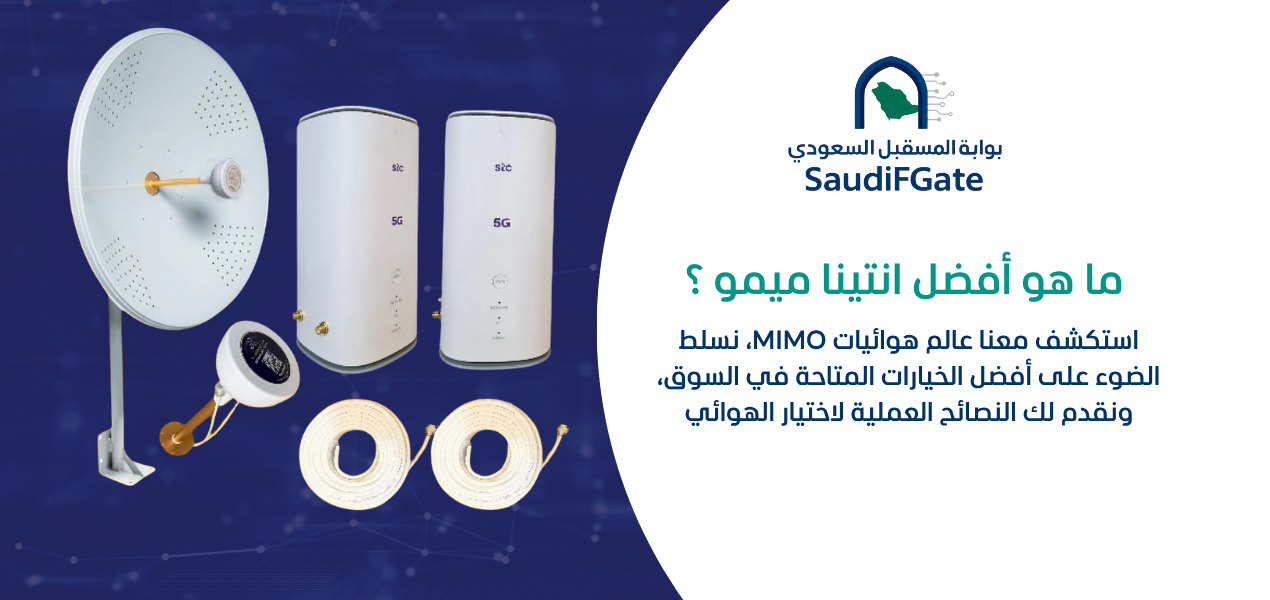
Should I install an external 5G antenna?
Consider an external antenna only after confirming that the router supports compatible external antennas and that inadequate radio reception contributes to the problem.
The installation must account for frequency compatibility, MIMO configuration, cable loss, mounting conditions, and applicable safety requirements.
Can an external antenna eliminate every internet disconnection?
No. An antenna cannot independently resolve provider outages, service congestion, software faults, or local network problems.
Its potential value should be assessed using measurements before and after installation.
How Do I Install the Antenna for a More Stable 5G Connection?
How do I know which antenna is compatible with my router?
Identify the exact router model, supported frequency bands, external antenna connectors, and MIMO requirements using official device specifications.
Do not assume that two routers with similar names have identical antenna capabilities.
Where should an outdoor antenna be installed?
The location should be selected based on practical signal measurements, safe structural mounting, cable routing, and the environmental conditions of the property.
Installation on rooftops or elevated structures requires appropriate safety measures and qualified personnel where applicable.
Does antenna direction affect internet stability?
Yes. Directional antennas are designed to operate with particular reception patterns, and incorrect alignment may reduce performance.
Evaluate signal quality and actual connection stability while testing suitable orientations.
Can a long antenna cable reduce signal performance?
Yes. Coaxial cables introduce signal loss, which depends on cable type, length, connectors, and operating frequency.
Careful cable selection and installation are important when evaluating the expected benefits of an external antenna.

Is Ethernet Better Than Wi-Fi for Video Conferencing?
Does an Ethernet cable prevent wireless interference?
Yes. Connecting directly through Ethernet removes the local Wi-Fi radio link from the path between the computer and router.
However, the connection may still experience issues elsewhere in the network.
Will Ethernet make my 5G internet faster?
It may improve measured performance when Wi-Fi is the limiting factor, but it does not increase the cellular network capacity available to the router.
Should I connect my work computer directly to the router?
For a stationary workstation where reliable cabling is possible, Ethernet is often a sensible option for improving local connection consistency.
Check that the cable, router port, and computer network adapter support the intended connection speed.
Can Router Settings Improve Video Meeting Stability?
Should I enable QoS for video calls?
Quality of Service, or QoS, can help manage network traffic and prioritize selected applications or devices when supported and correctly configured.
Its effectiveness depends on the router implementation and the source of congestion.
What is Smart Queue Management?
Smart Queue Management, or SQM, refers to techniques that manage packet queues to reduce excessive delay during network congestion.
When implemented properly, suitable queue management may improve responsiveness during simultaneous uploads and downloads.
Should I change my router DNS settings?
Changing Domain Name System settings may affect domain lookup behavior, but it is not a general solution for packet loss, unstable radio reception, or inadequate upload capacity.
Only adjust DNS when diagnostics indicate a relevant name-resolution problem.
Should I disable router security features to make calls faster?
No. Do not disable essential security protections as a routine performance fix.
Investigate compatibility or configuration issues using official guidance while maintaining appropriate network security.
Can updating router firmware improve stability?
Firmware updates may address known bugs, compatibility problems, or security vulnerabilities.
Use official firmware for the exact model, follow manufacturer instructions, and preserve configuration information when appropriate.
How Do I Check Whether My Laptop Is Causing Video Call Freezing?
Can a slow computer cause frozen video?
Yes. High processor or memory usage, thermal throttling, outdated drivers, and application problems may affect audio and video processing.
Check system resource usage while the meeting application is running.
Can an outdated Wi-Fi driver cause disconnections?
It can. Driver defects or compatibility issues may contribute to unstable wireless connections.
Use driver updates from trusted manufacturer or operating system sources when appropriate.
How do I separate camera problems from internet problems?
Test the camera and microphone locally, then compare behavior during a video meeting.
If the local video preview is already freezing, investigate device performance and camera settings before blaming the internet connection.
Should I close unnecessary applications before meetings?
Closing applications that consume significant CPU, memory, or network bandwidth may improve performance.
Prioritize applications actually causing resource pressure rather than shutting down essential services indiscriminately.
What Should I Do When Video Calls Drop Only at Certain Times?
Can evening network congestion affect meetings?
It may. Higher local demand can affect available throughput or latency on some networks, although the extent varies by operator, technology, and location.
How can I collect evidence of recurring disconnections?
Record the time of failure, router connection status, available signal measurements, speed and latency results, and whether other devices were affected.
This information can help distinguish repeating patterns from isolated problems.
When should I contact my internet service provider?
Contact the provider when tests indicate recurring upstream instability, especially if multiple devices experience the same problem over both wired and wireless connections.
Provide recorded measurements and times rather than relying on a general description such as "the internet is slow."
What Is the Best Network Setup for Working From Home in Saudi Arabia?
Should my work computer use a separate network?
A dedicated network or traffic management configuration may be useful in some environments, particularly when isolation or predictable performance is important.
However, separating devices does not automatically create additional internet bandwidth.
Should I have a backup internet connection for important meetings?
A secondary connection can provide additional resilience when uninterrupted connectivity is important.
Its usefulness depends on having a genuinely independent service path and appropriate switching or failover equipment.
Can a UPS prevent internet interruptions?
An Uninterruptible Power Supply, or UPS, may keep compatible networking equipment running through short local power interruptions.
It will not prevent disconnections caused by cellular signal problems, provider outages, or external network faults.
What should I prioritize when designing my home office network?
Prioritize a stable primary internet connection, reliable local connectivity, appropriate router capacity, secure configuration, and tested contingency procedures where business continuity requires them.
| Home Office Requirement | Recommended Approach | Important Limitation |
|---|---|---|
| Stable workstation connection | Use Ethernet where practical | Does not resolve upstream provider faults |
| Consistent Wi-Fi coverage | Optimize access point placement and channels | Coverage alone does not guarantee available bandwidth |
| Reliable 5G reception | Measure radio conditions and optimize placement | Network congestion may remain |
| Low delay during uploads | Consider suitable QoS or queue management | Depends on device capabilities and configuration |
| Power interruption resilience | Use appropriately specified backup power | Cannot prevent external network outages |
| Business-critical connectivity | Evaluate independent backup internet | Requires suitable failover design and testing |

What Are the Most Common Mistakes When Troubleshooting Video Call Internet?
Is replacing the router before testing a mistake?
It can be. Buying a new router without identifying the bottleneck may fail to improve the connection.
Test local networking, device behavior, and internet service conditions first.
Is relying only on download speed misleading?
Yes. Real-time communication also depends on upload stability, latency, jitter, and packet loss.
Can continuously restarting the router hide the real problem?
Yes. Restarting may temporarily restore service without resolving the underlying cause.
Repeated failures should prompt a review of logs, firmware, power, connection quality, and environmental conditions.
Is installing a powerful antenna always the best solution?
No. Antenna gain alone does not determine overall performance.
Compatibility, alignment, cable loss, signal environment, and the underlying network must all be considered.
Should I change every advanced router setting at once?
No. Change one relevant setting at a time, document the original configuration, and repeat comparable tests.
Multiple simultaneous changes make it difficult to determine which adjustment helped or caused a new problem.
How Can Future Networks Help Improve Internet Stability?
Can I ask about my existing 5G router?
Yes. You can contact Future Networks to discuss networking equipment, router compatibility, and available solutions relevant to your connection requirements.
Prepare the exact router model and a description of the issue so the available options can be evaluated accurately.
What information should I provide about video call problems?
Explain whether the problem occurs over Ethernet, Wi-Fi, or both; identify the internet service type; and provide any available speed, latency, or cellular signal measurements.
Should I buy an antenna before checking the router?
No. Confirm the router's external antenna support and determine whether inadequate reception is actually contributing to the problem.
A suitable technical assessment can help avoid unnecessary equipment purchases.
Can equipment changes guarantee uninterrupted video calls?
No network product can guarantee that all external outages or service disruptions will disappear.
The objective is to identify controllable causes, improve reliability where possible, and select appropriate contingency solutions for important communications.
What Are the Most Frequently Asked Questions About Internet Drops During Video Calls?
1. Why does my internet keep dropping during video calls?
Possible causes include weak Wi-Fi reception, packet loss, unstable upload speed, high latency, router problems, internet provider interruptions, or application issues. Testing each part of the connection helps identify the cause.
2. Why does Zoom freeze when my speed test is good?
A short speed test may not detect intermittent packet loss, jitter, unstable uploads, or device performance problems that affect real-time meetings.
3. Does Ethernet improve Zoom and Microsoft Teams calls?
Ethernet can improve local network reliability by avoiding wireless interference, but it does not resolve upstream internet problems.
4. Is 5G internet reliable enough for working from home?
It can be when local signal conditions, network capacity, equipment, and application requirements are suitable. Reliability should be measured at the actual location.
5. How do I reduce packet loss during video calls?
Identify where the loss occurs, test a wired connection, check network congestion, review router settings, and investigate the provider connection when necessary.
6. Can an external 5G antenna improve video meetings?
It may help when weak cellular reception contributes to unstable performance and the router supports a compatible installation.
7. What causes robotic audio during online meetings?
Packet loss, jitter, network congestion, device processing limitations, and application problems can cause distorted or interrupted audio.
8. Does QoS help video conferencing?
Suitable QoS features may improve responsiveness when network traffic is competing for limited capacity, but they do not increase the internet service's actual bandwidth.
9. Why does my internet work well in the morning but poorly in the evening?
Time-dependent congestion or interference may contribute to the difference. Repeated measurements are needed to identify a consistent pattern.
10. Should I replace my router if video calls keep freezing?
Only after testing whether the router is responsible. Many video call problems originate from Wi-Fi conditions, upstream connectivity, device performance, or application behavior.
What Checklist Should I Follow to Fix Internet Drops During Meetings?
What should I test before purchasing new equipment?
Follow this troubleshooting checklist in order and document the results before moving to a more expensive solution.
- ☐ Record when and how the video call problem occurs.
- ☐ Test more than one conferencing application if possible.
- ☐ Check computer resource usage during a meeting.
- ☐ Update the conferencing application from its official source.
- ☐ Compare Wi-Fi performance with Ethernet.
- ☐ Test another device on the same connection.
- ☐ Measure both upload and download speeds.
- ☐ Monitor latency and packet loss over time.
- ☐ Check whether large background uploads coincide with freezing.
- ☐ Review Wi-Fi coverage and possible interference.
- ☐ Inspect router connection status and available logs.
- ☐ Review official router firmware updates.
- ☐ Check 5G RSRP, RSRQ and SINR where available.
- ☐ Compare internet performance at different times.
- ☐ Test suitable router placement without exposing it to excessive heat.
- ☐ Evaluate QoS or queue management if the router supports it.
- ☐ Verify external antenna compatibility before purchasing one.
- ☐ Contact the internet provider if upstream instability is confirmed.
- ☐ Repeat the tests after making one relevant change.
- ☐ Consider an independent backup connection for critical meetings.
How Do I Prevent Video Call Connection Problems in the Future?
Should I test my connection before an important meeting?
Yes. Verify that the internet connection is working, conferencing software is updated, and the selected microphone and camera operate correctly.
For important meetings, it may be useful to conduct a short test call using the same equipment and location.
Should I keep router settings and test results documented?
Yes. A basic record of router configuration, significant changes, and recurring problems can make future troubleshooting more efficient.
Can a backup connection improve business continuity?
Yes. An appropriately configured secondary internet service can reduce dependence on a single connection, although switching behavior and service independence should be tested in advance.
Conclusion: How Do I Stop Internet Drops During Video Calls?
To stop internet drops during video calls, identify the source of instability before changing equipment. Compare Ethernet and Wi-Fi, measure upload performance, latency, jitter, and packet loss, and inspect router behavior during the actual problem.
If you use 5G home internet, examine cellular signal quality and time-dependent network conditions. Consider router placement, compatible external antennas, and traffic management only when the measurements support those solutions.
A reliable connection comes from addressing the actual bottleneck, not simply buying a faster router or focusing on download speed.
For networking equipment, 5G router compatibility, and internet reception solutions in Saudi Arabia, visit Future Networks | بوابة المستقبل للشبكات or contact the team to discuss your connection requirements.